Discovering-Minecraft
崩溃报告(Crash Report)
什么是崩溃报告
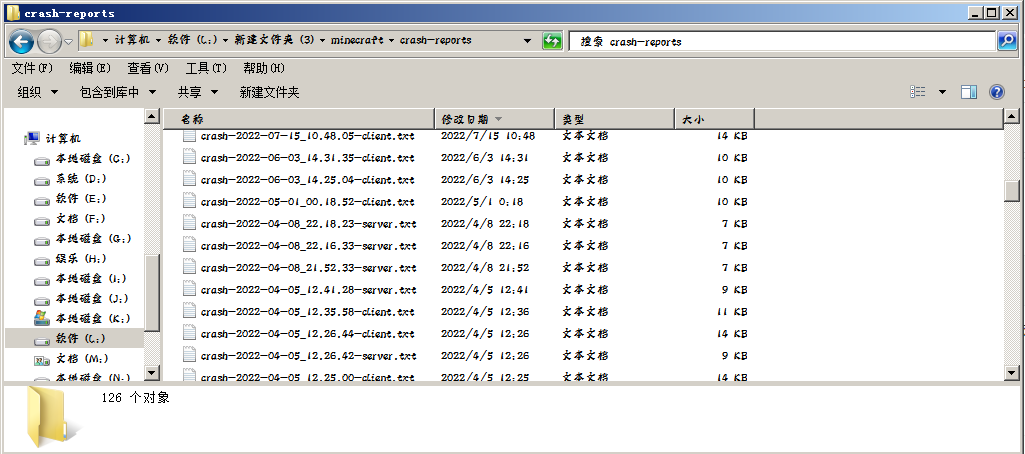
崩溃报告时Minecraft在遇到可以被其发现并处理的致命错误时生成的报告,报告中给出了错误发生的直接原因以及故障发生的环境。
注意“可以被其发现并处理”,这意味着如果有崩溃报告出现,那么问题很可能是游戏本体及其Mod本身的Bug而不是Java本身的错误。
崩溃报告的位置
崩溃报告会被存储在游戏目录中的crash-reports文件夹下,名称类似于crash-2019-06-29_01.27.40-server.txt,指明了问题发生的时间和大概位置。
崩溃报告的结构
这是一个典型的服务端崩溃报告:
---- Minecraft Crash Report ----
// But it works on my machine.

Time: 19-6-29 上午1:27
Description: Exception in server tick loop

java.lang.OutOfMemoryError: unable to create new native thread
    at java.lang.Thread.start0(Native Method)
    at java.lang.Thread.start(Unknown Source)
    at java.util.concurrent.ForkJoinPool.createWorker(Unknown Source)
    at java.util.concurrent.ForkJoinPool.tryAddWorker(Unknown Source)
    at java.util.concurrent.ForkJoinPool.signalWork(Unknown Source)
    at java.util.concurrent.ForkJoinPool.externalPush(Unknown Source)
    at java.util.concurrent.ForkJoinPool.execute(Unknown Source)
    at agk.f(SourceFile:108)
    at agk.a(SourceFile:101)
    at uu.a(SourceFile:102)
    at uz$d.a(SourceFile:439)
    at uz.a(SourceFile:123)
    at ve.l(SourceFile:198)
    at ve.b(SourceFile:44)
    at ve$a.p(SourceFile:434)
    at ve.d(SourceFile:194)
    at net.minecraft.server.MinecraftServer.aW(SourceFile:708)
    at net.minecraft.server.MinecraftServer.p(SourceFile:696)
    at agh.bf(SourceFile:99)
    at net.minecraft.server.MinecraftServer.o(SourceFile:680)
    at net.minecraft.server.MinecraftServer.run(SourceFile:636)
    at java.lang.Thread.run(Unknown Source)


A detailed walkthrough of the error, its code path and all known details is as follows:
---------------------------------------------------------------------------------------

-- System Details --
Details:
    Minecraft Version: 1.14
    Operating System: Windows 7 (x86) version 6.1
    Java Version: 1.8.0_211, Oracle Corporation
    Java VM Version: Java HotSpot(TM) Client VM (mixed mode), Oracle Corporation
    Memory: 227244656 bytes (216 MB) / 1073741824 bytes (1024 MB) up to 1073741824 bytes (1024 MB)
    JVM Flags: 12 total; -XX:+UnlockExperimentalVMOptions -XX:+UseG1GC -XX:G1NewSizePercent=20 -XX:G1ReservePercent=20 -XX:MaxGCPauseMillis=50 -XX:G1HeapRegionSize=16M -XX:-UseAdaptiveSizePolicy -XX:-OmitStackTraceInFastThrow -Xmn128m -Xss1M -Xmx1024m -XX:HeapDumpPath=MojangTricksIntelDriversForPerformance_javaw.exe_minecraft.exe.heapdump
    Player Count: 1 / 8; [vh['love827'/315, l='新的世界827', x=-271.91, y=68.17, z=1769.16]]
    Data Packs: vanilla
    Type: Integrated Server (map_client.txt)
    Is Modded: Probably not. Jar signature remains and both client + server brands are untouched.
主要分为以下几个部分:
文件名
crash-2019-06-29_01.27.40-server.txt
给出了崩溃发生的时间和位置。可能的后缀:
- server:内置服务端,负责处理游戏机制和进行世界存储等。
- client:客户端,负责渲染和处理用户输入等。
- fml:Forge,负责加载Mod和协调Mod间关系。
标题和时间
---- Minecraft Crash Report ----
// But it works on my machine.

Time: 19-6-29 上午1:27
故障原因概述
Description: Exception in server tick loop
这里给出了故障出现的大概原因,但非常笼统。
堆栈踪迹(Stacktrace)
java.lang.OutOfMemoryError: unable to create new native thread
    at java.lang.Thread.start0(Native Method)
    at java.lang.Thread.start(Unknown Source)
    at java.util.concurrent.ForkJoinPool.createWorker(Unknown Source)
    at java.util.concurrent.ForkJoinPool.tryAddWorker(Unknown Source)
    at java.util.concurrent.ForkJoinPool.signalWork(Unknown Source)
    at java.util.concurrent.ForkJoinPool.externalPush(Unknown Source)
    at java.util.concurrent.ForkJoinPool.execute(Unknown Source)
    at agk.f(SourceFile:108)
    at agk.a(SourceFile:101)
    at uu.a(SourceFile:102)
    at uz$d.a(SourceFile:439)
    at uz.a(SourceFile:123)
    at ve.l(SourceFile:198)
    at ve.b(SourceFile:44)
    at ve$a.p(SourceFile:434)
    at ve.d(SourceFile:194)
    at net.minecraft.server.MinecraftServer.aW(SourceFile:708)
    at net.minecraft.server.MinecraftServer.p(SourceFile:696)
    at agh.bf(SourceFile:99)
    at net.minecraft.server.MinecraftServer.o(SourceFile:680)
    at net.minecraft.server.MinecraftServer.run(SourceFile:636)
    at java.lang.Thread.run(Unknown Source)
堆栈踪迹通常是崩溃报告中最有价值的内容,因为这里给出了崩溃发生的具体时机和原因,其分析方法见“如何看懂崩溃报告”一小节。
问题发生环境
A detailed walkthrough of the error, its code path and all known details is as follows:
---------------------------------------------------------------------------------------

-- System Details --
Details:
    Minecraft Version: 1.14        //Minecraft版本
    Operating System: Windows 7 (x86) version 6.1        //操作系统
    Java Version: 1.8.0_211, Oracle Corporation        //Java版本
    Java VM Version: Java HotSpot(TM) Client VM (mixed mode), Oracle Corporation        //Java虚拟机版本
    Memory: 227244656 bytes (216 MB) / 1073741824 bytes (1024 MB) up to 1073741824 bytes (1024 MB)        //内存用量
    JVM Flags: 12 total; -XX:+UnlockExperimentalVMOptions -XX:+UseG1GC -XX:G1NewSizePercent=20 -XX:G1ReservePercent=20 -XX:MaxGCPauseMillis=50 -XX:G1HeapRegionSize=16M -XX:-UseAdaptiveSizePolicy -XX:-OmitStackTraceInFastThrow -Xmn128m -Xss1M -Xmx1024m -XX:HeapDumpPath=MojangTricksIntelDriversForPerformance_javaw.exe_minecraft.exe.heapdump        //Java启动参数
    Player Count: 1 / 8; [vh['love827'/315, l='新的世界827', x=-271.91, y=68.17, z=1769.16]]        //世界中的玩家信息,包括数量,实体ID,所在存档名称和坐标。
    Data Packs: vanilla        //加载的数据包
    Type: Integrated Server (map_client.txt)        //运行的Minecraft类型,是客户端还是专门的服务器,不必关注
    Is Modded: Probably not. Jar signature remains and both client + server brands are untouched.        //客户端是否被修改
给出了问题发生的环境,上面只包含了系统信息。
此处信息量很大,有时还会包含一些其他信息,如(但是除了Mod列表和嫌疑Mod外,大部分信息还是留给开发者去调试的):
- Mod列表
Forge:
Mod List:
        forge-1.16.5-36.1.4-client.jar                    |Minecraft                     |minecraft                     |1.16.5              |NONE      |NOSIGNATURE
        forge-1.16.5-36.1.4-universal.jar                 |Forge                         |forge                         |36.1.4              |NONE      |22:af:21:d8:19:82:7f:93:94:fe:2b:ac:b7:e4:41:57:68:39:87:b1:a7:5c:c6:44:f9:25:74:21:14:f5:0d:90
Fabric:
Fabric Mods: carpet: Carpet Mod in Fabric 1.4.17
               minecraft: Minecraft 1.16.4
- 嫌疑Mod
Suspected Mods: Lithium (lithium)
一些崩溃处理Mod对导致问题的Mod的一个初步判断,但不是百分百准确的。
- 崩溃时打开的界面
-- Affected screen --
  Screen name: net.minecraft.class_413
- 崩溃时运算的维度
-- Affected level --
Details:
    All players: 1 total; [class_3222['lovexyn0827'/132, l='ServerLevel[1.16 Longterm]', x=-170.67, y=180.00, z=801.43]]        //玩家信息
    Chunk stats: ServerChunkCache: 3874        //加载的区块数量
    Level dimension: minecraft:overworld        //维度ID
    Level spawn location: World: (208,67,0), Chunk: (at 0,4,0 in 13,0; contains blocks 208,0,0 to 223,255,15), Region: (0,0; contains chunks 0,0 to 31,31, blocks 0,0,0 to 511,255,511)        //出生点
    Level time: 15378509 game time, 15634561 day time        //世界时间
    Level name: 1.16 Longterm        //存档名称
    Level game mode: Game mode: survival (ID 0). Hardcore: false. Cheats: false        //游戏模式,是否启用极限或作弊
    Level weather: Rain time: 5185 (now: true), thunder time: 122551 (now: false)        //天气信息
    Known server brands: vanilla, fabric        //服务端类型
    Level was modded: true        //是否在安装有Mod的情况下运行
    Level storage version: 0x04ABD - Anvil        //存档格式
- 崩溃时运算的实体
-- Entity being ticked --
Details:
    Entity Type: twilightforest:redcap (twilightforest.entity.EntityTFRedcap)        //实体注册ID
    Entity ID: 64958        //实体ID
    Entity Name: Redcap Goblin        //实体名称
    Entity's Exact location: 2049.66, 26.79, 1265.60        //实体坐标
    Entity's Block location: World: (2049,26,1265), Chunk: (at 1,1,1 in 128,79; contains blocks 2048,0,1264 to 2063,255,1279), Region: (4,2; contains chunks 128,64 to 159,95, blocks 2048,0,1024 to 2559,255,1535)        //实体坐标,但是换了些表示方法
    Entity's Momentum: 0.01, -0.20, 0.16        //实体动量,或者说速度
    Entity's Passengers: []        //骑乘该实体的实体
    Entity's Vehicle: ~~ERROR~~ NullPointerException: Cannot invoke "net.minecraft.entity.Entity.toString()" because the return value of "net.minecraft.entity.Entity.func_184187_bx()" is null        //实体骑乘的载具,此处载具不存在
- 崩溃时更新的方块
-- Block being updated --
Details:
    Source block type: ID #minecraft:powered_rail (block.minecraft.powered_rail // net.minecraft.class_2442)        //方块注册ID
    Block: Block{minecraft:powered_rail}[powered=true,shape=east_west]        //方块状态
    Block location: World: (77,72,-270), Chunk: (at 13,4,2 in 4,-17; contains blocks 64,0,-272 to 79,255,-257), Region: (0,-1; contains chunks 0,-32 to 31,-1, blocks 0,0,-512 to 511,255,-1)        //方块位置
如何看懂崩溃报告
崩溃报告的核心是其中的堆栈踪迹,所以看懂崩溃报告主要是从堆栈踪迹中提取信息。
注意看第一行:
java.lang.OutOfMemoryError: unable to create new native thread
这里给出了导致崩溃的异常类型OutOfMemoryError及一些附加信息。看到这里,相信一些英语比较好的读者就能看出问题所在了,即因为内存不足而无法创建新线程。
这里给出几种常见的异常类型及其可能原因:
- NullPointerException:空指针异常,可能是Minecraft及其Mod本身的Bug。
- IllegalArgumentException:参数有误,可能是Minecraft及其Mod本身的Bug。
- IllegalStateException:程序状态有误,可能是Minecraft及其Mod本身的Bug。
- ArrayIndexOutOfBoundsException、ArithmeticException、NumberFormatException、UnsupportedOperationException、ConcurrentModificationException和NoSuchElementException:都是程序运行中的常见错误,很可能是Minecraft及其Mod本身的Bug。
- IOException:输入输出异常,原因可能是磁盘空间(包括Minecraft所在分区和系统盘)已满‘、磁盘因突然断电而出现坏道、网络异常(可能性较小,因为网络造成的问题一般都被忽略)等。
- FileNotFoundException:找不到文件或文件名不合理,有时可能与中文路径有关。
- IllegalAccessError:非法访问,通常是java版本过高,(也有可能是Minecraft安装或Mod兼容问题?)。
- NoSuchFieldError和NoSuchMethodError:找不到方法或字段,Java版本过高,Mod不兼容,和误用未混淆Mod都有可能造成这一问题。
- NoClassDefFoundError:通常是Java版本过低或过高,也有可能是Mod兼容问题或Minecraft安装错误。
- UnsatisfiedLinkError:本地库丢失或损坏,通常是Minecraft安装出现问题。
- ExceptionInInitializerError:类初始化失败,原因很多样。
- OutOfMemoryError:内存溢出。
- StackOverflowError:堆栈溢出,可能是可能是Minecraft及其Mod本身的Bug,也有可能是游戏内使用更新抑制器时操作不当。
- ClassNotFoundException:类不存在,可能是Mod兼容问题、Java版本过高或Minecraft安装有误。
- ClassCastException:类转换不合理,可能是Java版本过高或Mod兼容问题。
- ConnectException:网络连接超时,一般不会造成崩溃。
- UnknownHostException:找不到服务器,一般是网络问题,且通常不会造成崩溃。
- MixinTransformerError、MixinApplyError、InvalidInjectionException等:Mixin注入失败,通常是Mod兼容问题。
这些异常建议大家尽可能记住,它们能为接下来的问题解决提供一个方向,有时它们甚至能直接指明问题所在。
异常名称后面是对异常成因的一段简短描述,英文过关的话可以从中提取关于该问题的一定信息。当然也可以只抓关键词。
刚才只是一个标题,接下来,才是堆栈踪迹的正文:
    at java.lang.Thread.start0(Native Method)
    at java.lang.Thread.start(Unknown Source)
    at java.util.concurrent.ForkJoinPool.createWorker(Unknown Source)
    at java.util.concurrent.ForkJoinPool.tryAddWorker(Unknown Source)
    at java.util.concurrent.ForkJoinPool.signalWork(Unknown Source)
    at java.util.concurrent.ForkJoinPool.externalPush(Unknown Source)
    at java.util.concurrent.ForkJoinPool.execute(Unknown Source)
    at agk.f(SourceFile:108)
    at agk.a(SourceFile:101)
    at uu.a(SourceFile:102)
    at uz$d.a(SourceFile:439)
    at uz.a(SourceFile:123)
    at ve.l(SourceFile:198)
    at ve.b(SourceFile:44)
    at ve$a.p(SourceFile:434)
    at ve.d(SourceFile:194)
    at net.minecraft.server.MinecraftServer.aW(SourceFile:708)
    at net.minecraft.server.MinecraftServer.p(SourceFile:696)
    at agh.bf(SourceFile:99)
    at net.minecraft.server.MinecraftServer.o(SourceFile:680)
    at net.minecraft.server.MinecraftServer.run(SourceFile:636)
    at java.lang.Thread.run(Unknown Source)
可能会让人看起来一筹莫展,但我们并不需要完全理解这一大堆,那是开发者的任务,我们要做的应该是从中提取关键词。例如,下面看到这一行,你会想到哪一个Mod呢?
at com.replaymod.simplepathing.ReplayModSimplePathing.onReplayClosing(ReplayModSimplePathing.java:178)
很明显这里出现了“replaymod”,这给出了造成崩溃的直接原因。
那么,这一个呢:
at carpet.utils.SpawnReporter.registerSpawn(SpawnReporter.java:86)
也许你也猜到了,不过,如果这里出现的名称是一个更加小众化的呢?在后面常用维修技巧一节中,我们会更深入地探讨这一话题。
当然,堆栈踪迹中还有这样一类:
at agk.f(SourceFile:108)
或是这样的:
at net.minecraft.class_437.method_25423(class_437.java:325)
总之名称看起来是没有任何意义的。这些是混淆后的Minecraft本体。
有时,堆栈踪迹可能会有这样的结构:
java.lang.RuntimeException: Could not execute entrypoint stage 'main' due to errors, provided by 'mcwmem'!
    at net.fabricmc.loader.entrypoint.minecraft.hooks.EntrypointUtils.invoke0(EntrypointUtils.java:53)
    at net.fabricmc.loader.entrypoint.minecraft.hooks.EntrypointUtils.invoke(EntrypointUtils.java:36)
    at net.fabricmc.loader.entrypoint.minecraft.hooks.EntrypointClient.start(EntrypointClient.java:32)
    at net.minecraft.client.MinecraftClient.<init>(MinecraftClient.java:437)
    at net.minecraft.client.main.Main.main(Main.java:177)
    at sun.reflect.NativeMethodAccessorImpl.invoke0(Native Method)
    at sun.reflect.NativeMethodAccessorImpl.invoke(Unknown Source)
    at sun.reflect.DelegatingMethodAccessorImpl.invoke(Unknown Source)
    at java.lang.reflect.Method.invoke(Unknown Source)
    at net.fabricmc.loader.game.MinecraftGameProvider.launch(MinecraftGameProvider.java:226)
    at net.fabricmc.loader.launch.knot.Knot.init(Knot.java:139)
    at net.fabricmc.loader.launch.knot.KnotClient.main(KnotClient.java:27)
    at net.fabricmc.devlaunchinjector.Main.main(Main.java:86)
Caused by: net.minecraft.util.crash.CrashException: Couldn't copy scarpet scripts
    at lovexyn0827.mcwmem.MCWMEMod.onInitialize(MCWMEMod.java:49)
    at net.fabricmc.loader.entrypoint.minecraft.hooks.EntrypointUtils.invoke0(EntrypointUtils.java:50)
    ... 12 more
Caused by: java.lang.NullPointerException
    at java.util.Objects.requireNonNull(Unknown Source)
    at java.nio.file.Files.copy(Unknown Source)
    at lovexyn0827.mcwmem.MCWMEMod.copyScript(MCWMEMod.java:57)
    at lovexyn0827.mcwmem.MCWMEMod.onInitialize(MCWMEMod.java:45)
    ... 13 more
注意里面的“Caused by”。直接造成崩溃的异常后面有时会跟着几个“Caused by”来引出那个异常背后更深层次的原因及那些深层异常的堆栈踪迹。一般来说,最后一个“Caused by”后的异常通常是该问题较为根本的原因。
防止从崩溃报告中泄露隐私信息
崩溃报告中可能会包含一些不方便公开的信息,如用户名、存档名称甚至服务器IP等,如果需要的话,建议从崩溃报告中找到那些信息并将其删除或替换为某些不影响正常故障诊断的值。